

Last Updated on May 8, 2026 by The Official Game Rules Team
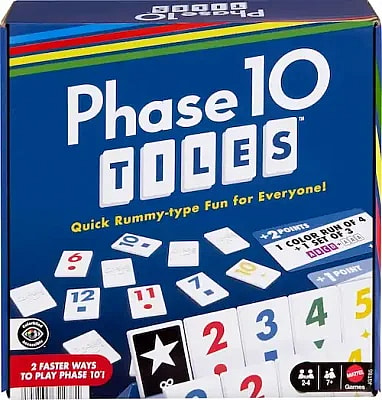
If you’re looking for a clear explanation of how to play the tile version of Phase 10, this guide breaks down both Quick Play and Classic modes step by step. Phase 10 gets a fresh twist in Phase 10 Tiles, replacing cards with durable tiles and introducing a fast-paced scoring system in Quick Play. The objective remains familiar: complete phases before your opponents and clear your tiles as efficiently as possible. Let’s walk through setup, gameplay, scoring, and strategy.
Want to play Phase 10 with a standard deck of cards? Learn how to play here.
This post contains affiliate links. For more information, see our disclosures here.
How to Play Phase 10 Tiles
Game Overview
- Multiple players (each gets a tile rack)
- Two game modes: Quick Play and Classic
- Goal: Complete phases and score points before your opponents
More of a visual learner? Click here to watch the video tutorial
Quick Play Rules
Quick Play is the faster, point-based version of Phase 10 Tiles.
Objective (Quick Play)
Be the first player to score 10 points by completing phases and going out.
Setup
- Shuffle the 32 Phase Cards and place them facedown as a draw pile.
- Each player takes:
- 1 tile rack
- 5 scoring cards (place logo-side up to show zero points)
- Mix all tiles facedown in the center. This area is called the boneyard.
- Each player draws 10 tiles and places them on their rack.
- Flip 1 tile faceup from the boneyard.
- Flip over the top 3 Phase Cards so all players can see them.
- The youngest player goes first. Play proceeds clockwise.
Turn Structure (Quick Play)
On your turn, you must follow this sequence:
1. Draw
Take either:
- 1 facedown tile from the boneyard
- OR the single faceup tile
Add it to your rack.
2. Lay Down a Phase (Optional)
If you can complete one of the three available phases, you may lay it down.
Important rules:
- You may only complete one phase per round.
- You must complete the entire phase before laying it down.
- Partial phases are not allowed.
Place completed phase tiles faceup in front of you.
Types of Phases
Phases may require combinations such as:
- Sets – Tiles with the same number
- Runs – Sequential numbers
- Colors – Same-colored tiles
Each faceup Phase Card shows the required combination and its point value.
After laying down a phase, update your score by flipping your scoring cards to your new total.
3. Hit (Optional)
After completing your phase, you may “hit.”
Hitting means:
- Adding single tiles from your rack to any completed phase on the table (including your own).
- The tile must legally extend or match that phase.
You may hit multiple times during your turn.
You cannot hit unless you have already completed your phase.
4. Discard
End your turn by discarding 1 tile faceup to the boneyard.
Special Tiles
Wild Tiles
Wild tiles can represent:
- Any number
- Any color
Rules for Wilds:
- You may use multiple Wilds in a phase.
- At least one natural (numbered) tile must be included.
- Once placed, a Wild’s value cannot change during the round.
- Faceup Wilds may be drawn normally.
Skip Tiles
Skip tiles force another player to lose their turn.
To use a Skip:
- Instead of discarding to the boneyard, place it faceup in front of a player.
- When that player’s turn comes up, it is skipped.
- The Skip tile is removed from play for the rest of the round.
Restrictions:
- A player may only have one Skip in front of them at a time.
- Skip tiles cannot be used in phases.
- If the first flipped tile is a Skip, the first player is skipped.
Ending a Round (Quick Play)
The round ends when a player:
- Plays all their tiles
- Discards their final tile
That player:
- Scores a bonus equal to the point value of the next Phase Card flipped.
Then:
- Remove the 3 faceup Phase Cards.
- Reveal 3 new Phase Cards for the next round.
- Return all tiles to the boneyard.
- The player who went out starts the next round.
First player to reach 10 points wins immediately.
Classic Mode Rules
Classic mode follows the traditional progression system from Phase 10, but uses tiles and the boneyard instead of cards.
Key differences from Quick Play:
- No rotating Phase Cards.
- Players must complete phases in numerical order (Phase 1 through Phase 10).
- Standard Phase 10 rules apply for advancement and scoring.
This version is longer and more strategic.
Strategy Tips for Phase 10 Tiles
1. Study the Available Phases
In Quick Play, only 3 phases are available each round. Choose the one that:
- Matches your starting tiles
- Has strong scoring value
2. Don’t Rush Your Phase
Sometimes waiting one turn allows you to:
- Improve your combination
- Use fewer Wilds
- Set up better hits later
3. Use Skip Tiles Strategically
Best targets:
- Players close to going out
- Players who just completed a phase
- Players about to score bonus points
4. Save Wilds for Flexibility
Wilds are powerful but limited by the “one natural tile required” rule. Keep at least one real tile to anchor your phase.
5. Hit Aggressively
Once your phase is down:
- Focus entirely on shedding tiles
- Look at every phase on the table
- Multiple hits per turn can swing the round
6. Track Opponents’ Progress
Watch:
- How many tiles they have left
- Whether they’ve completed a phase
- If they’re likely to go out soon
Timing matters.
Video Tutorial
Frequently Asked Questions (FAQ)
Only one.
No. You must complete the full phase before placing it on the table.
No. Hitting is only allowed after your phase is down.
No. Once used in a phase, the Wild’s number and color stay fixed for the rest of the round.
No. Skip tiles are never part of phases.
The first player is skipped and the Skip tile is removed.
Quick Play uses rotating Phase Cards and first-to-10-points scoring. Classic follows traditional Phase 1–10 progression.
Conclusion
Phase 10 Tiles combines the familiar structure of Phase 10 with the tactile satisfaction of tile play. Quick Play delivers a faster, point-race experience, while Classic mode stays true to the original phase progression fans love.
Whether you’re building sets, extending runs, strategically using Wilds, or timing a devastating Skip tile, Phase 10 Tiles rewards both planning and adaptability. Master the phases, manage your rack efficiently, and be the first to clear your tiles to win.
Browse Related Games!
 Official Coup Rules
 Official Casting Shadows Rules
 Official Penguin Panic! Rules
 Official Twenty-Nine Rules
 Official Betrayal Deck of Lost Souls Rules
 Official Crazy Eights Rules
 Official Monopoly Buy Everything Rules
 Official Hanabi Rules
 Official Countries of the World: Guess in 10 Rules
Official The Fox in The Forest Rules
Official Countries of the World: Guess in 10 Rules
Official The Fox in The Forest Rules
 Official UNO Flip Rules
 Official Command of Nature Rules